README.md
| 1 | --- |
| 2 | license: mit |
| 3 | tags: |
| 4 | - vision |
| 5 | - image-segmentation |
| 6 | datasets: |
| 7 | - scene_parse_150 |
| 8 | widget: |
| 9 | - src: https://huggingface.co/datasets/shi-labs/oneformer_demo/blob/main/ade20k.jpeg |
| 10 | example_title: House |
| 11 | - src: https://huggingface.co/datasets/shi-labs/oneformer_demo/blob/main/demo_2.jpg |
| 12 | example_title: Airplane |
| 13 | - src: https://huggingface.co/datasets/shi-labs/oneformer_demo/blob/main/coco.jpeg |
| 14 | example_title: Person |
| 15 | --- |
| 16 | |
| 17 | # OneFormer |
| 18 | |
| 19 | OneFormer model trained on the ADE20k dataset (tiny-sized version, Swin backbone). It was introduced in the paper [OneFormer: One Transformer to Rule Universal Image Segmentation](https://arxiv.org/abs/2211.06220) by Jain et al. and first released in [this repository](https://github.com/SHI-Labs/OneFormer). |
| 20 | |
| 21 |  |
| 22 | |
| 23 | ## Model description |
| 24 | |
| 25 | OneFormer is the first multi-task universal image segmentation framework. It needs to be trained only once with a single universal architecture, a single model, and on a single dataset, to outperform existing specialized models across semantic, instance, and panoptic segmentation tasks. OneFormer uses a task token to condition the model on the task in focus, making the architecture task-guided for training, and task-dynamic for inference, all with a single model. |
| 26 | |
| 27 | 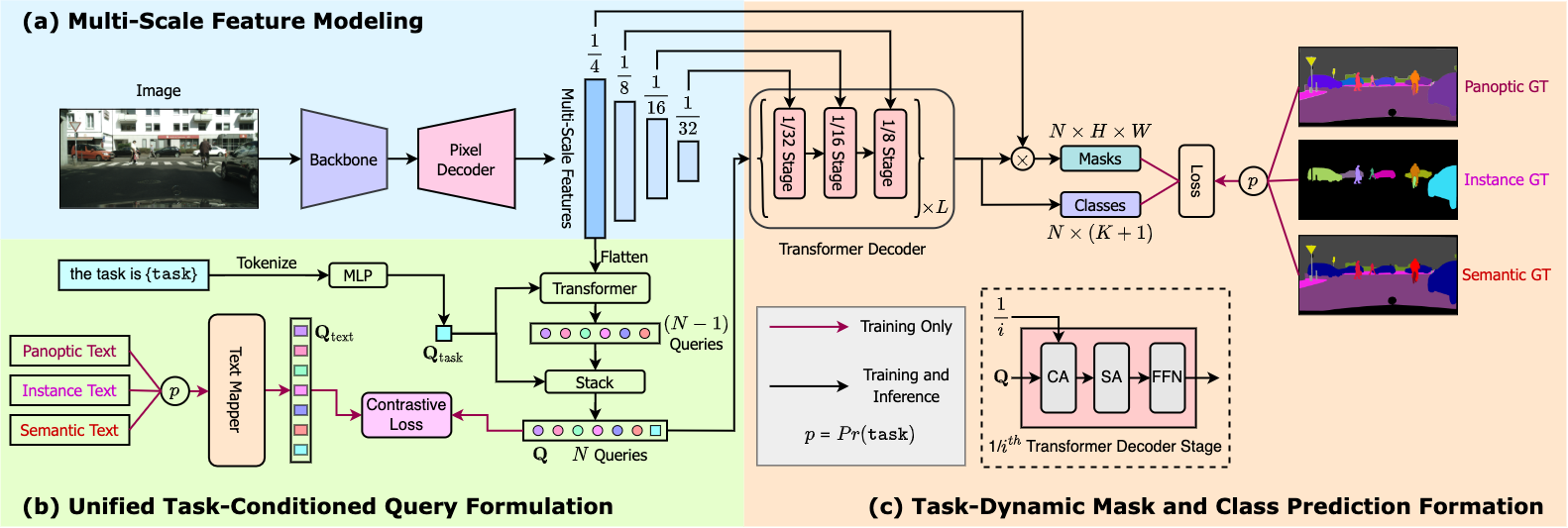 |
| 28 | |
| 29 | ## Intended uses & limitations |
| 30 | |
| 31 | You can use this particular checkpoint for semantic, instance and panoptic segmentation. See the [model hub](https://huggingface.co/models?search=oneformer) to look for other fine-tuned versions on a different dataset. |
| 32 | |
| 33 | ### How to use |
| 34 | |
| 35 | Here is how to use this model: |
| 36 | |
| 37 | ```python |
| 38 | from transformers import OneFormerProcessor, OneFormerForUniversalSegmentation |
| 39 | from PIL import Image |
| 40 | import requests |
| 41 | url = "https://huggingface.co/datasets/shi-labs/oneformer_demo/blob/main/ade20k.jpeg" |
| 42 | image = Image.open(requests.get(url, stream=True).raw) |
| 43 | |
| 44 | # Loading a single model for all three tasks |
| 45 | processor = OneFormerProcessor.from_pretrained("shi-labs/oneformer_ade20k_swin_tiny") |
| 46 | model = OneFormerForUniversalSegmentation.from_pretrained("shi-labs/oneformer_ade20k_swin_tiny") |
| 47 | |
| 48 | # Semantic Segmentation |
| 49 | semantic_inputs = processor(images=image, task_inputs=["semantic"], return_tensors="pt") |
| 50 | semantic_outputs = model(**semantic_inputs) |
| 51 | # pass through image_processor for postprocessing |
| 52 | predicted_semantic_map = processor.post_process_semantic_segmentation(outputs, target_sizes=[image.size[::-1]])[0] |
| 53 | |
| 54 | # Instance Segmentation |
| 55 | instance_inputs = processor(images=image, task_inputs=["instance"], return_tensors="pt") |
| 56 | instance_outputs = model(**instance_inputs) |
| 57 | # pass through image_processor for postprocessing |
| 58 | predicted_instance_map = processor.post_process_instance_segmentation(outputs, target_sizes=[image.size[::-1]])[0]["segmentation"] |
| 59 | |
| 60 | # Panoptic Segmentation |
| 61 | panoptic_inputs = processor(images=image, task_inputs=["panoptic"], return_tensors="pt") |
| 62 | panoptic_outputs = model(**panoptic_inputs) |
| 63 | # pass through image_processor for postprocessing |
| 64 | predicted_semantic_map = processor.post_process_panoptic_segmentation(outputs, target_sizes=[image.size[::-1]])[0]["segmentation"] |
| 65 | ``` |
| 66 | |
| 67 | For more examples, please refer to the [documentation](https://huggingface.co/docs/transformers/master/en/model_doc/oneformer). |
| 68 | |
| 69 | ### Citation |
| 70 | |
| 71 | ```bibtex |
| 72 | @article{jain2022oneformer, |
| 73 | title={{OneFormer: One Transformer to Rule Universal Image Segmentation}}, |
| 74 | author={Jitesh Jain and Jiachen Li and MangTik Chiu and Ali Hassani and Nikita Orlov and Humphrey Shi}, |
| 75 | journal={arXiv}, |
| 76 | year={2022} |
| 77 | } |
| 78 | ``` |
| 79 | |