README_zh_CN.md
| 1 | --- |
| 2 | license: other |
| 3 | license_name: tencent-hunyuan-community |
| 4 | license_link: LICENSE |
| 5 | pipeline_tag: text-to-image |
| 6 | library_name: transformers |
| 7 | --- |
| 8 | |
| 9 | |
| 10 | [English Documentation](./README.md) |
| 11 | |
| 12 | <div align="center"> |
| 13 | |
| 14 | <img src="./assets/logo.png" alt="HunyuanImage-3.0 Logo" width="600"> |
| 15 | |
| 16 | # 🎨 HunyuanImage-3.0: 强大的原生多模态图像生成模型 |
| 17 | |
| 18 | </div> |
| 19 | |
| 20 | |
| 21 | <div align="center"> |
| 22 | <img src="./assets/banner.png" alt="HunyuanImage-3.0 Banner" width="800"> |
| 23 | |
| 24 | </div> |
| 25 | |
| 26 | <div align="center"> |
| 27 | <a href=https://hunyuan.tencent.com/image target="_blank"><img src=https://img.shields.io/badge/Official%20Site-333399.svg?logo=homepage height=22px></a> |
| 28 | <a href=https://huggingface.co/tencent/HunyuanImage-3.0-Instruct target="_blank"><img src=https://img.shields.io/badge/%F0%9F%A4%97%20Models-d96902.svg height=22px></a> |
| 29 | <a href=https://github.com/Tencent-Hunyuan/HunyuanImage-3.0 target="_blank"><img src= https://img.shields.io/badge/Page-bb8a2e.svg?logo=github height=22px></a> |
| 30 | <a href=https://arxiv.org/pdf/2509.23951 target="_blank"><img src=https://img.shields.io/badge/Report-b5212f.svg?logo=arxiv height=22px></a> |
| 31 | <a href=https://x.com/TencentHunyuan target="_blank"><img src=https://img.shields.io/badge/Hunyuan-black.svg?logo=x height=22px></a> |
| 32 | <a href=https://docs.qq.com/doc/DUVVadmhCdG9qRXBU target="_blank"><img src=https://img.shields.io/badge/📚-提示词手册-blue.svg?logo=book height=22px></a> |
| 33 | </div> |
| 34 | |
| 35 | |
| 36 | <p align="center"> |
| 37 | 👏 加入我们的 <a href="./assets/WECHAT.md" target="_blank">微信</a> 和 <a href="https://discord.gg/ehjWMqF5wY">Discord</a> | |
| 38 | 💻 <a href="https://hunyuan.tencent.com/chat/HunyuanDefault?from=modelSquare&modelId=Hunyuan-Image-3.0-Instruct">官网试用我们的模型!</a>   |
| 39 | </p> |
| 40 | |
| 41 | ## 🔥🔥🔥 最新消息 |
| 42 | |
| 43 | - **2026年1月26日**: 🚀 **[HunyuanImage-3.0-Instruct-Distil](https://huggingface.co/tencent/HunyuanImage-3.0-Instruct-Distil)** - 蒸馏版本用于高效部署(推荐8步采样)。 |
| 44 | - **2026年1月26日**: 🎉 **[HunyuanImage-3.0-Instruct](https://huggingface.co/tencent/HunyuanImage-3.0-Instruct)** - 发布了 **Instruct(带推理能力)**版本,支持智能提示词增强和**图像到图像**生成用于创意编辑。 |
| 45 | - **2025年10月30日**: 🚀 **[HunyuanImage-3.0 vLLM 加速](./vllm_infer/README.md)** - 通过 vLLM 支持实现显著更快的推理速度。 |
| 46 | - **2025年09月28日**: 📖 **[HunyuanImage-3.0 技术报告](https://arxiv.org/pdf/2509.23951)** - 全面的技术文档现已发布。 |
| 47 | - **2025年09月28日**: 🎉 **[HunyuanImage-3.0 开源](https://github.com/Tencent-Hunyuan/HunyuanImage-3.0)** - 推理代码和模型权重现已公开可用。 |
| 48 | |
| 49 | |
| 50 | ## 🧩 社区贡献 |
| 51 | |
| 52 | 如果您在项目中使用或开发了 HunyuanImage-3.0,欢迎告知我们。 |
| 53 | |
| 54 | ## 📑 开源计划 |
| 55 | |
| 56 | - HunyuanImage-3.0 (图像生成模型) |
| 57 | - [x] 推理代码 |
| 58 | - [x] HunyuanImage-3.0 模型权重 |
| 59 | - [x] HunyuanImage-3.0-Instruct 模型权重(带推理能力) |
| 60 | - [x] vLLM 支持 |
| 61 | - [x] 蒸馏版本权重 |
| 62 | - [x] 图像到图像生成 |
| 63 | - [ ] 多轮交互能力 |
| 64 | |
| 65 | |
| 66 | ## 🗂️ 目录 |
| 67 | - [🔥🔥🔥 最新消息](#-最新消息) |
| 68 | - [🧩 社区贡献](#-社区贡献) |
| 69 | - [📑 开源计划](#-开源计划) |
| 70 | - [📖 概览](#-概览) |
| 71 | - [✨ 模型亮点](#-模型亮点) |
| 72 | - [🚀 使用方法](#-使用方法) |
| 73 | - [📦 环境配置](#-环境配置) |
| 74 | - [📥 安装依赖](#-安装依赖) |
| 75 | - [HunyuanImage-3.0 (文本生成图像)](#hunyuanimage-30-文本生成图像) |
| 76 | - [🔥 使用 Transformers 快速开始](#-使用-transformers-快速开始) |
| 77 | - [1️⃣ 下载模型权重](#1-下载模型权重) |
| 78 | - [2️⃣ 使用 Transformers 运行](#2-使用-transformers-运行) |
| 79 | - [🏠 本地安装和使用](#-本地安装和使用) |
| 80 | - [1️⃣ 克隆仓库](#1-克隆仓库) |
| 81 | - [2️⃣ 下载模型权重](#2-下载模型权重) |
| 82 | - [3️⃣ 运行演示](#3-运行演示) |
| 83 | - [4️⃣ 命令行参数](#4-命令行参数) |
| 84 | - [🎨 交互式 Gradio 演示](#-交互式-gradio-演示) |
| 85 | - [1️⃣ 安装 Gradio](#1-安装-gradio) |
| 86 | - [2️⃣ 配置环境](#2-配置环境) |
| 87 | - [3️⃣ 启动 Web 界面](#3-启动-web-界面) |
| 88 | - [4️⃣ 访问界面](#4-访问界面) |
| 89 | - [HunyuanImage-3.0-Instruct](#hunyuanimage-30-instruct-指令推理和图像到图像生成包括编辑和多图像融合) |
| 90 | - [🔥 使用 Transformers 快速开始](#-使用-transformers-快速开始-1) |
| 91 | - [1️⃣ 下载模型权重](#1-下载模型权重-1) |
| 92 | - [2️⃣ 使用 Transformers 运行](#2-使用-transformers-运行-1) |
| 93 | - [🏠 本地安装和使用](#-本地安装和使用-1) |
| 94 | - [1️⃣ 克隆仓库](#1-克隆仓库-1) |
| 95 | - [2️⃣ 下载模型权重](#2-下载模型权重-1) |
| 96 | - [3️⃣ 运行演示](#3-运行演示-1) |
| 97 | - [4️⃣ 命令行参数](#4-命令行参数-1) |
| 98 | - [5️⃣ 更少的采样步数](#5-更少的采样步数) |
| 99 | - [🧱 模型卡片](#-模型卡片) |
| 100 | - [📊 评估结果](#-评估结果) |
| 101 | - [HunyuanImage-3.0-Instruct 评估](#hunyuanimage-30-instruct-评估) |
| 102 | - [HunyuanImage-3.0 评估](#hunyuanimage-30-评估) |
| 103 | - [🖼️ 展示](#-展示) |
| 104 | - [HunyuanImage-3.0-Instruct 展示](#hunyuanimage-30-instruct-展示) |
| 105 | - [📚 引用](#-引用) |
| 106 | - [🙏 致谢](#-致谢) |
| 107 | - [🌟🚀 GitHub Star 历史](#-github-star-历史) |
| 108 | |
| 109 | --- |
| 110 | |
| 111 | ## 📖 概览 |
| 112 | |
| 113 | **HunyuanImage-3.0** 是一个突破性的原生多模态模型,它在自回归框架内统一了多模态理解和生成任务。它的文生图和图生图能力实现了与领先的闭源模型**相当或更优**的性能。 |
| 114 | |
| 115 | |
| 116 | <div align="center"> |
| 117 | <img src="./assets/framework.png" alt="HunyuanImage-3.0 Framework" width="90%"> |
| 118 | </div> |
| 119 | |
| 120 | ## ✨ 模型亮点 |
| 121 | |
| 122 | * 🧠 **统一的多模态架构:** HunyuanImage-3.0 突破当前主流的 DiT 架构,采用统一的自回归框架。该设计能更直接、统一地对文本与图像模态进行建模,实现了语义理解与图像生成的高度融合,从而生成效果惊人、语境丰富的图像。 |
| 123 | |
| 124 | * 🏆 **最大规模图像生成MoE模型:** 作为当前开源社区参数规模最大的图像生成 MoE 模型,其拥有64个专家、总参数量达 800 亿,单 token 激活 130 亿参数,显著提升了模型容量与性能表现。 |
| 125 | |
| 126 | * 🎨 **卓越的图像生成质量:** 通过精细的数据集构建与强化学习后训练,我们在语义准确性与视觉表现力间取得最佳平衡。该模型不仅能精准遵循提示词要求,更可生成细节丰富、具有摄影级真实感与艺术美感的图像。 |
| 127 | |
| 128 | * 💭 **智能图像理解与世界知识推理:** 得益于统一的多模态架构,HunyuanImage-3.0 拥有强大的推理能力。它不仅能深度理解用户输入的图像,还能利用其海量的世界知识精准解读用户意图。针对简略的提示词(prompts),它能够自动补全符合语境的细节,从而生成更出色、更完整的视觉作品。 |
| 129 | |
| 130 | |
| 131 | ## 🚀 使用方法 |
| 132 | |
| 133 | ### 📦 环境配置 |
| 134 | |
| 135 | * 🐍 **Python:** 3.12+ (推荐并已测试) |
| 136 | * ⚡ **CUDA:** 12.8 |
| 137 | |
| 138 | #### 📥 安装依赖 |
| 139 | |
| 140 | ```bash |
| 141 | # 1. 首先安装 PyTorch (CUDA 12.8 版本) |
| 142 | pip install torch==2.8.0 torchvision==0.23.0 torchaudio==2.8.0 --index-url https://download.pytorch.org/whl/cu128 |
| 143 | |
| 144 | # 2. 安装 tencentcloud-sdk |
| 145 | pip install -i https://mirrors.tencent.com/pypi/simple/ --upgrade tencentcloud-sdk-python |
| 146 | |
| 147 | # 3. 然后安装其他依赖 |
| 148 | pip install -r requirements.txt |
| 149 | ``` |
| 150 | |
| 151 | 为了**获得多达3倍的推理加速**,请安装以下优化: |
| 152 | |
| 153 | ```bash |
| 154 | # FlashInfer 用于优化的 moe 推理。v0.5.0 已测试。 |
| 155 | pip install flashinfer-python==0.5.0 |
| 156 | ``` |
| 157 | > 💡**安装提示:** PyTorch 使用的 CUDA 版本必须与系统的 CUDA 版本匹配,这一点至关重要。 |
| 158 | > FlashInfer 依赖此兼容性在运行时编译内核。 |
| 159 | > 推荐使用 GCC 版本 >=9 来编译 FlashAttention 和 FlashInfer。 |
| 160 | |
| 161 | > ⚡ **性能提示:** 这些优化可以显著加快您的推理速度! |
| 162 | |
| 163 | > 💡**注意:** 启用 FlashInfer 时,首次推理可能会较慢(约 10 分钟),因为需要编译内核。在同一台机器上的后续推理会快得多。 |
| 164 | |
| 165 | ### HunyuanImage-3.0 (文本生成图像) |
| 166 | |
| 167 | #### 🔥 使用 Transformers 快速开始 |
| 168 | |
| 169 | ##### 1️⃣ 下载模型权重 |
| 170 | |
| 171 | ```bash |
| 172 | # 从 HuggingFace 下载并重命名目录。 |
| 173 | # 注意目录名称不应包含点号,否则使用 Transformers 加载时可能出现问题。 |
| 174 | hf download tencent/HunyuanImage-3.0 --local-dir ./HunyuanImage-3 |
| 175 | ``` |
| 176 | |
| 177 | ##### 2️⃣ 使用 Transformers 运行 |
| 178 | |
| 179 | ```python |
| 180 | from transformers import AutoModelForCausalLM |
| 181 | |
| 182 | # 加载模型 |
| 183 | model_id = "./HunyuanImage-3" |
| 184 | # 目前我们无法使用 HF 模型 ID `tencent/HunyuanImage-3.0` 直接加载模型 |
| 185 | # 因为名称中包含点号。 |
| 186 | |
| 187 | kwargs = dict( |
| 188 | attn_implementation="sdpa", # 如果已安装 FlashAttention,可使用 "flash_attention_2" |
| 189 | trust_remote_code=True, |
| 190 | torch_dtype="auto", |
| 191 | device_map="auto", |
| 192 | moe_impl="eager", # 如果已安装 FlashInfer,可使用 "flashinfer" |
| 193 | ) |
| 194 | |
| 195 | model = AutoModelForCausalLM.from_pretrained(model_id, **kwargs) |
| 196 | model.load_tokenizer(model_id) |
| 197 | |
| 198 | # 生成图像 |
| 199 | prompt = "一只棕色和白色相间的小狗奔跑在草地上" |
| 200 | image = model.generate_image(prompt=prompt, stream=True) |
| 201 | image.save("image.png") |
| 202 | ``` |
| 203 | |
| 204 | |
| 205 | #### 🏠 本地安装和使用 |
| 206 | |
| 207 | ##### 1️⃣ 克隆仓库 |
| 208 | |
| 209 | ```bash |
| 210 | git clone https://github.com/Tencent-Hunyuan/HunyuanImage-3.0.git |
| 211 | cd HunyuanImage-3.0/ |
| 212 | ``` |
| 213 | |
| 214 | ##### 2️⃣ 下载模型权重 |
| 215 | |
| 216 | ```bash |
| 217 | # 从 HuggingFace 下载 |
| 218 | hf download tencent/HunyuanImage-3.0 --local-dir ./HunyuanImage-3 |
| 219 | ``` |
| 220 | |
| 221 | ##### 3️⃣ 运行演示 |
| 222 | |
| 223 | 预训练检查点不会自动重写或增强输入提示词,为了获得最佳效果,我们目前建议社区伙伴使用 deepseek 来重写提示词。您可以前往[腾讯云](https://cloud.tencent.com/document/product/1772/115963#.E5.BF.AB.E9.80.9F.E6.8E.A5.E5.85.A5)申请 API Key。 |
| 224 | |
| 225 | ```bash |
| 226 | # 不使用 PE |
| 227 | export MODEL_PATH="./HunyuanImage-3" |
| 228 | python3 run_image_gen.py \ |
| 229 | --model-id $MODEL_PATH \ |
| 230 | --verbose 1 \ |
| 231 | --prompt "一只棕色和白色相间的小狗奔跑在草地上" \ |
| 232 | --bot-task image \ |
| 233 | --image-size "1024x1024" \ |
| 234 | --save ./image.png \ |
| 235 | --moe-impl flashinfer |
| 236 | |
| 237 | # 使用 PE |
| 238 | export DEEPSEEK_KEY_ID="your_deepseek_key_id" |
| 239 | export DEEPSEEK_KEY_SECRET="your_deepseek_key_secret" |
| 240 | export MODEL_PATH="./HunyuanImage-3" |
| 241 | python3 run_image_gen.py \ |
| 242 | --model-id $MODEL_PATH \ |
| 243 | --verbose 1 \ |
| 244 | --prompt "一只棕色和白色相间的小狗奔跑在草地上" \ |
| 245 | --bot-task image \ |
| 246 | --image-size "1024x1024" \ |
| 247 | --save ./image.png \ |
| 248 | --moe-impl flashinfer \ |
| 249 | --rewrite 1 |
| 250 | |
| 251 | ``` |
| 252 | |
| 253 | ##### 4️⃣ 命令行参数 |
| 254 | |
| 255 | | 参数 | 说明 | 推荐值 | |
| 256 | |----------------------|------------------------------------------------|-------------| |
| 257 | | `--prompt` | 输入提示词 | (必填) | |
| 258 | | `--model-id` | 模型路径 | (必填) | |
| 259 | | `--attn-impl` | Attention 实现方式。可选 `sdpa` 或 `flash_attention_2` | `sdpa` | |
| 260 | | `--moe-impl` | MoE 实现方式。可选 `eager` 或 `flashinfer` | `flashinfer` | |
| 261 | | `--seed` | 图像生成的随机种子 | `None` | |
| 262 | | `--diff-infer-steps` | Diffusion 推理步数 | `50` | |
| 263 | | `--image-size` | 图像分辨率。可以是 `auto`、`1280x768` 或 `16:9` | `auto` | |
| 264 | | `--save` | 图像保存路径 | `image.png` | |
| 265 | | `--verbose` | 详细程度。0: 无日志;1: 记录推理信息。 | `0` | |
| 266 | | `--rewrite` | 是否启用重写 | `1` | |
| 267 | |
| 268 | #### 🎨 交互式 Gradio 演示 |
| 269 | |
| 270 | 启动交互式 Web 界面,方便进行文本到图像生成。 |
| 271 | |
| 272 | ##### 1️⃣ 安装 Gradio |
| 273 | |
| 274 | ```bash |
| 275 | pip install gradio>=4.21.0 |
| 276 | ``` |
| 277 | |
| 278 | ##### 2️⃣ 配置环境 |
| 279 | |
| 280 | ```bash |
| 281 | # 设置您的模型路径 |
| 282 | export MODEL_ID="path/to/your/model" |
| 283 | |
| 284 | # 可选:配置 GPU 使用(默认:0,1,2,3) |
| 285 | export GPUS="0,1,2,3" |
| 286 | |
| 287 | # 可选:配置主机和端口(默认:0.0.0.0:443) |
| 288 | export HOST="0.0.0.0" |
| 289 | export PORT="443" |
| 290 | ``` |
| 291 | |
| 292 | ##### 3️⃣ 启动 Web 界面 |
| 293 | |
| 294 | **基础启动:** |
| 295 | ```bash |
| 296 | sh run_app.sh |
| 297 | ``` |
| 298 | |
| 299 | **使用性能优化:** |
| 300 | ```bash |
| 301 | # 同时使用两种优化以获得最佳性能 |
| 302 | sh run_app.sh --moe-impl flashinfer --attn-impl flash_attention_2 |
| 303 | ``` |
| 304 | |
| 305 | ##### 4️⃣ 访问界面 |
| 306 | |
| 307 | > 🌐 **Web 界面:** 打开浏览器并访问 `http://localhost:443`(或您配置的端口) |
| 308 | |
| 309 | |
| 310 | |
| 311 | <details> |
| 312 | <summary> 最新版本(图像到图像和文本图像到图像) </summary> |
| 313 | |
| 314 | ### HunyuanImage-3.0-Instruct (指令推理和图像到图像生成,包括编辑和多图像融合) |
| 315 | |
| 316 | #### 🔥 使用 Transformers 快速开始 |
| 317 | |
| 318 | ##### 1️⃣ 下载模型权重 |
| 319 | |
| 320 | ```bash |
| 321 | # 从 HuggingFace 下载并重命名目录。 |
| 322 | # 注意目录名称不应包含点号,否则使用 Transformers 加载时可能出现问题。 |
| 323 | hf download tencent/HunyuanImage-3.0-Instruct --local-dir ./HunyuanImage-3-Instruct |
| 324 | ``` |
| 325 | |
| 326 | ##### 2️⃣ 使用 Transformers 运行 |
| 327 | |
| 328 | ```python |
| 329 | from transformers import AutoModelForCausalLM |
| 330 | |
| 331 | # 加载模型 |
| 332 | model_id = "./HunyuanImage-3-Instruct" |
| 333 | # 目前我们无法使用 HF 模型 ID `tencent/HunyuanImage-3.0-Instruct` 直接加载模型 |
| 334 | # 因为名称中包含点号。 |
| 335 | |
| 336 | kwargs = dict( |
| 337 | attn_implementation="sdpa", |
| 338 | trust_remote_code=True, |
| 339 | torch_dtype="auto", |
| 340 | device_map="auto", |
| 341 | moe_impl="eager", # 如果已安装 FlashInfer,可使用 "flashinfer" |
| 342 | moe_drop_tokens=True, |
| 343 | ) |
| 344 | |
| 345 | model = AutoModelForCausalLM.from_pretrained(model_id, **kwargs) |
| 346 | model.load_tokenizer(model_id) |
| 347 | |
| 348 | # 图像到图像生成 (TI2I) |
| 349 | prompt = "基于图一的logo,参考图二中冰箱贴的材质,制作一个新的冰箱贴" |
| 350 | |
| 351 | input_img1 = "./assets/demo_instruct_imgs/input_1_0.png" |
| 352 | input_img2 = "./assets/demo_instruct_imgs/input_1_1.png" |
| 353 | imgs_input = [input_img1, input_img2] |
| 354 | |
| 355 | cot_text, samples = model.generate_image( |
| 356 | prompt=prompt, |
| 357 | image=imgs_input, |
| 358 | seed=42, |
| 359 | image_size="auto", |
| 360 | use_system_prompt="en_unified", |
| 361 | bot_task="think_recaption", # 使用 "think_recaption" 进行推理和增强 |
| 362 | infer_align_image_size=True, # 将输出图像大小对齐到输入图像大小 |
| 363 | diff_infer_steps=50, |
| 364 | verbose=2 |
| 365 | ) |
| 366 | |
| 367 | # 保存生成的图像 |
| 368 | samples[0].save("image_edit.png") |
| 369 | ``` |
| 370 | |
| 371 | #### 🏠 本地安装和使用 |
| 372 | |
| 373 | ##### 1️⃣ 克隆仓库 |
| 374 | |
| 375 | ```bash |
| 376 | git clone https://github.com/Tencent-Hunyuan/HunyuanImage-3.0.git |
| 377 | cd HunyuanImage-3.0/ |
| 378 | ``` |
| 379 | |
| 380 | ##### 2️⃣ 下载模型权重 |
| 381 | |
| 382 | ```bash |
| 383 | # 从 HuggingFace 下载 |
| 384 | hf download tencent/HunyuanImage-3.0-Instruct --local-dir ./HunyuanImage-3-Instruct |
| 385 | ``` |
| 386 | |
| 387 | ##### 3️⃣ 运行演示 |
| 388 | |
| 389 | 更多演示在 `run_demo_instruct.sh` 中。 |
| 390 | |
| 391 | ```bash |
| 392 | export MODEL_PATH="./HunyuanImage-3-Instruct" |
| 393 | bash run_demo_instruct.sh |
| 394 | ``` |
| 395 | |
| 396 | ##### 4️⃣ 命令行参数 |
| 397 | |
| 398 | | 参数 | 说明 | 推荐值 | |
| 399 | |----------------------|------------------------------------------------|-------------| |
| 400 | | `--prompt` | 输入提示词 | (必填) | |
| 401 | | `--image` | 要处理的图像。多个图像使用逗号分隔的路径(例如 'img1.png,img2.png') | (必填) | |
| 402 | | `--model-id` | 模型路径 | (必填) | |
| 403 | | `--attn-impl` | Attention 实现方式。目前仅支持 'sdpa' | `sdpa` | |
| 404 | | `--moe-impl` | MoE 实现方式。可选 `eager` 或 `flashinfer` | `flashinfer` | |
| 405 | | `--seed` | 图像生成的随机种子。使用 None 表示随机种子 | `None` | |
| 406 | | `--diff-infer-steps` | 推理步数 | `50` | |
| 407 | | `--image-size` | 图像分辨率。可以是 `auto`、`1280x768` 或 `16:9` | `auto` | |
| 408 | | `--use-system-prompt` | 系统提示词类型。选项:`None`、`dynamic`、`en_vanilla`、`en_recaption`、`en_think_recaption`、`en_unified`、`custom` | `en_unified` | |
| 409 | | `--system-prompt` | 自定义系统提示词。当 `--use-system-prompt` 为 `custom` 时使用 | `None` | |
| 410 | | `--bot-task` | 任务类型。`image` 用于直接生成;`auto` 用于文本;`recaption` 用于重写->图像;`think_recaption` 用于思考->重写->图像 | `think_recaption` | |
| 411 | | `--save` | 图像保存路径 | `image.png` | |
| 412 | | `--verbose` | 详细程度 | `2` | |
| 413 | | `--reproduce` | 是否复现结果 | `True` | |
| 414 | | `--infer-align-image-size` | 是否将目标图像大小对齐到源图像大小 | `True` | |
| 415 | | `--max_new_tokens` | 生成的最大 token 数 | `2048` | |
| 416 | | `--use-taylor-cache` | 采样时使用 Taylor Cache | `False` | |
| 417 | |
| 418 | ##### 5️⃣ 更少的采样步数 |
| 419 | |
| 420 | 我们推荐使用模型 [HunyuanImage-3.0-Instruct-Distil](https://huggingface.co/tencent/HunyuanImage-3.0-Instruct-Distil),设置 `--diff-infer-steps 8`,同时保持所有其他推荐参数值**不变**。 |
| 421 | |
| 422 | ```bash |
| 423 | # 从 HuggingFace 下载 HunyuanImage-3.0-Instruct-Distil |
| 424 | hf download tencent/HunyuanImage-3.0-Instruct-Distil --local-dir ./HunyuanImage-3-Instruct-Distil |
| 425 | |
| 426 | # 使用 8 步采样运行演示 |
| 427 | export MODEL_PATH="./HunyuanImage-3-Instruct-Distil" |
| 428 | bash run_demo_instruct_Distil.sh |
| 429 | ``` |
| 430 | |
| 431 | </details> |
| 432 | |
| 433 | ## 🧱 模型卡片 |
| 434 | |
| 435 | | 模型 | 参数量 | 下载地址 | 推荐显存 | 支持功能 | |
| 436 | |---------------------------| --- | --- | --- | --- | |
| 437 | | HunyuanImage-3.0 | 总计 80B (激活 13B) | [HuggingFace](https://huggingface.co/tencent/HunyuanImage-3.0) | ≥ 3 × 80 GB | ✅ 文本生成图像 |
| 438 | | HunyuanImage-3.0-Instruct | 总计 80B (激活 13B) | [HuggingFace](https://huggingface.co/tencent/HunyuanImage-3.0-Instruct) | ≥ 8 × 80 GB | ✅ 文本生成图像<br>✅ 文本图像到图像<br>✅ 提示词自动重写 <br>✅ CoT 思考 |
| 439 | | HunyuanImage-3.0-Instruct-Distil | 总计 80B (激活 13B) | [HuggingFace](https://huggingface.co/tencent/HunyuanImage-3.0-Instruct-Distil) | ≥ 8 × 80 GB |✅ 文本生成图像<br>✅ 文本图像到图像<br>✅ 提示词自动重写 <br>✅ CoT 思考 <br>✅ 更少的采样步数(推荐 8 步) |
| 440 | |
| 441 | 注意事项: |
| 442 | - 安装性能优化工具(FlashAttention、FlashInfer)以获得更快的推理速度。 |
| 443 | - 基础模型推荐使用多 GPU 推理。 |
| 444 | |
| 445 | ## 📊 评估结果 |
| 446 | |
| 447 | ### HunyuanImage-3.0-Instruct 评估 |
| 448 | * 👥 **GSB (人工评估)** |
| 449 | 我们采用了 GSB(好/相同/差)评估方法,该方法通常用于从整体图像感知角度评估两个模型之间的相对性能。我们总共使用了 1000+ 个单图像和多图像编辑案例,在一次运行中为所有比较的模型生成相等数量的图像样本。为了公平比较,我们对每个提示词只进行一次推理,避免任何结果筛选。在与基线方法比较时,我们保持了所有选定模型的默认设置。评估由 100 多名专业评估员执行。 |
| 450 | |
| 451 | <p align="center"> |
| 452 | <img src="./assets/gsb_instruct.png" width=60% alt="Human Evaluation with Other Models"> |
| 453 | </p> |
| 454 | |
| 455 | |
| 456 | ### HunyuanImage-3.0 评估 |
| 457 | |
| 458 | * 🤖 **SSAE (机器评估)** |
| 459 | SSAE(结构化语义对齐评估)是一种基于先进多模态大语言模型(MLLMs)的图像-文本对齐智能评估指标。我们提取了 12 个类别的 3500 个关键点,然后使用多模态大语言模型通过将生成的图像与这些关键点进行比较,基于图像的视觉内容自动评估和打分。平均图像准确率表示所有关键点的图像级平均分数,而全局准确率直接计算所有关键点的平均分数。 |
| 460 | |
| 461 | <p align="center"> |
| 462 | <img src="./assets/ssae_side_by_side_comparison.png" width=98% alt="Human Evaluation with Other Models"> |
| 463 | </p> |
| 464 | |
| 465 | <p align="center"> |
| 466 | <img src="./assets/ssae_side_by_side_heatmap.png" width=98% alt="Human Evaluation with Other Models"> |
| 467 | </p> |
| 468 | |
| 469 | |
| 470 | * 👥 **GSB (人工评估)** |
| 471 | |
| 472 | 我们采用了 GSB(好/相同/差)评估方法,该方法通常用于从整体图像感知角度评估两个模型之间的相对性能。我们总共使用了 1000 个文本提示词,在一次运行中为所有比较的模型生成相等数量的图像样本。为了公平比较,我们对每个提示词只进行一次推理,避免任何结果筛选。在与基线方法比较时,我们保持了所有选定模型的默认设置。评估由 100 多名专业评估员执行。 |
| 473 | |
| 474 | <p align="center"> |
| 475 | <img src="./assets/gsb.png" width=98% alt="Human Evaluation with Other Models"> |
| 476 | </p> |
| 477 | |
| 478 | ## 🖼️ 展示 |
| 479 | |
| 480 | 我们的模型可以遵循复杂指令生成高质量、富有创意的图像。 |
| 481 | |
| 482 | <div align="center"> |
| 483 | <img src="./assets/banner_all.jpg" width=100% alt="HunyuanImage 3.0 Demo"> |
| 484 | </div> |
| 485 | |
| 486 | 文本生成图像的展示,请点击以下链接: |
| 487 | |
| 488 | - [HunyuanImage-3.0](./Hunyuan-Image3.md) |
| 489 | |
| 490 | ### HunyuanImage-3.0-Instruct 展示 |
| 491 | |
| 492 | HunyuanImage-3.0-Instruct 展示了在智能图像生成和编辑方面的强大能力。以下展示突出了其核心功能: |
| 493 | |
| 494 | * 🧠 **智能视觉理解与推理(CoT Think)**: 模型执行结构化思考,分析用户输入的图像和提示词,将用户的意图和编辑任务扩展为结构化、全面的指令,从而带来更好的图像生成和编辑表现。 |
| 495 | |
| 496 | 将复杂的提示词和编辑任务分解为详细的视觉组件,包括主体、构图、光照、色彩搭配和风格。 |
| 497 | |
| 498 | * ✏️ **提示词自动重写**: 自动将稀疏或模糊的提示词增强为专业级、细节丰富的描述,更准确地捕捉用户意图。 |
| 499 | |
| 500 | * 🎨 **文本生成图像(T2I)**: 从文本提示词生成高质量图像,具有出色的提示词遵循度和照片级真实感。 |
| 501 | |
| 502 | * 🖼️ **图像到图像(TI2I)**: 支持创意图像编辑,包括添加元素、移除对象、修改风格和无缝背景替换,同时保留关键视觉元素。 |
| 503 | |
| 504 | * 🔀 **多图像融合**: 智能组合多个参考图像(最多3个参考图输入),创建融合来自不同来源的视觉元素的连贯合成图像。 |
| 505 | |
| 506 | |
| 507 | **展示 1: 详细的思考和推理过程** |
| 508 | |
| 509 | <div align="center"> |
| 510 | <img src="./assets/pg_instruct_imgs/cot_ti2i.gif" alt="HunyuanImage-3.0-Instruct Showcase 1" width="90%"> |
| 511 | </div> |
| 512 | |
| 513 | **展示 2: 具有复杂场景理解的创意 T2I 生成** |
| 514 | |
| 515 | > Prompt: 3D 毛绒质感拟人化马,暖棕浅棕肌理,穿藏蓝西装、白衬衫,戴深棕手套;疲惫带期待,坐于电脑前,旁置印 "HAPPY AGAIN" 的马克杯。橙红渐变背景,配超大号藏蓝粗体 "马上下班",叠加米黄 "Happy New Year" 并标 "(2026)"。橙红为主,藏蓝米黄撞色,毛绒温暖柔和。 |
| 516 | |
| 517 | <div align="center"> |
| 518 | <img src="./assets/pg_instruct_imgs/image0.png" alt="HunyuanImage-3.0-Instruct Showcase 2" width="75%"> |
| 519 | </div> |
| 520 | |
| 521 | **展示 3: 精确图像编辑与元素保留** |
| 522 | |
| 523 | <div align="center"> |
| 524 | <img src="./assets/pg_instruct_imgs/image1.png" alt="HunyuanImage-3.0-Instruct Showcase 3" width="85%"> |
| 525 | </div> |
| 526 | |
| 527 | **展示 4: 风格转换与主题增强** |
| 528 | |
| 529 | <div align="center"> |
| 530 | <img src="./assets/pg_instruct_imgs/image2.png" alt="HunyuanImage-3.0-Instruct Showcase 4" width="85%"> |
| 531 | </div> |
| 532 | |
| 533 | |
| 534 | **展示 5: 高级风格转换与产品效果图生成** |
| 535 | |
| 536 | <div align="center"> |
| 537 | <img src="./assets/pg_instruct_imgs/image3.png" alt="HunyuanImage-3.0-Instruct Showcase 5" width="85%"> |
| 538 | </div> |
| 539 | |
| 540 | |
| 541 | **展示 6: 多图像融合与创意合成** |
| 542 | |
| 543 | <div align="center"> |
| 544 | <img src="./assets/pg_instruct_imgs/image4.png" alt="HunyuanImage-3.0-Instruct Showcase 6" width="85%"> |
| 545 | </div> |
| 546 | |
| 547 | ## 📚 引用 |
| 548 | |
| 549 | 如果您在研究中发现 HunyuanImage-3.0 有用,请引用我们的工作: |
| 550 | |
| 551 | ```bibtex |
| 552 | @article{cao2025hunyuanimage, |
| 553 | title={HunyuanImage 3.0 Technical Report}, |
| 554 | author={Cao, Siyu and Chen, Hangting and Chen, Peng and Cheng, Yiji and Cui, Yutao and Deng, Xinchi and Dong, Ying and Gong, Kipper and Gu, Tianpeng and Gu, Xiusen and others}, |
| 555 | journal={arXiv preprint arXiv:2509.23951}, |
| 556 | year={2025} |
| 557 | } |
| 558 | ``` |
| 559 | |
| 560 | ## 🙏 致谢 |
| 561 | |
| 562 | 我们衷心感谢以下开源项目和社区的宝贵贡献: |
| 563 | |
| 564 | * 🤗 [Transformers](https://github.com/huggingface/transformers) - 最先进的 NLP 库 |
| 565 | * 🎨 [Diffusers](https://github.com/huggingface/diffusers) - 扩散模型库 |
| 566 | * 🌐 [HuggingFace](https://huggingface.co/) - AI 模型中心和社区 |
| 567 | * ⚡ [FlashAttention](https://github.com/Dao-AILab/flash-attention) - 内存高效的注意力机制 |
| 568 | * 🚀 [FlashInfer](https://github.com/flashinfer-ai/flashinfer) - 优化的推理引擎 |
| 569 | |
| 570 | ## 🌟🚀 GitHub Star 历史 |
| 571 | |
| 572 | [](https://github.com/Tencent-Hunyuan/HunyuanImage-3.0) |
| 573 | [](https://github.com/Tencent-Hunyuan/HunyuanImage-3.0) |
| 574 | |
| 575 | [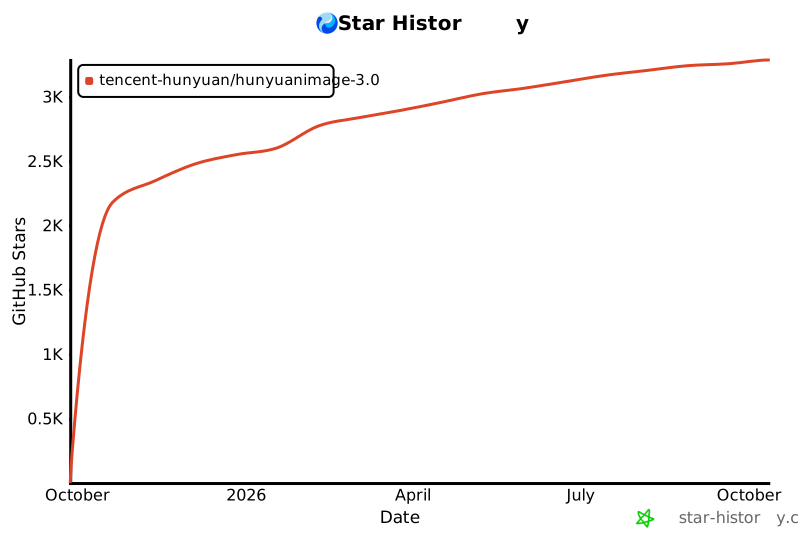](https://www.star-history.com/#Tencent-Hunyuan/HunyuanImage-3.0&Date) |
| 576 | |